
KI-Bewerbungsfoto erstellen
Beispielvorschau
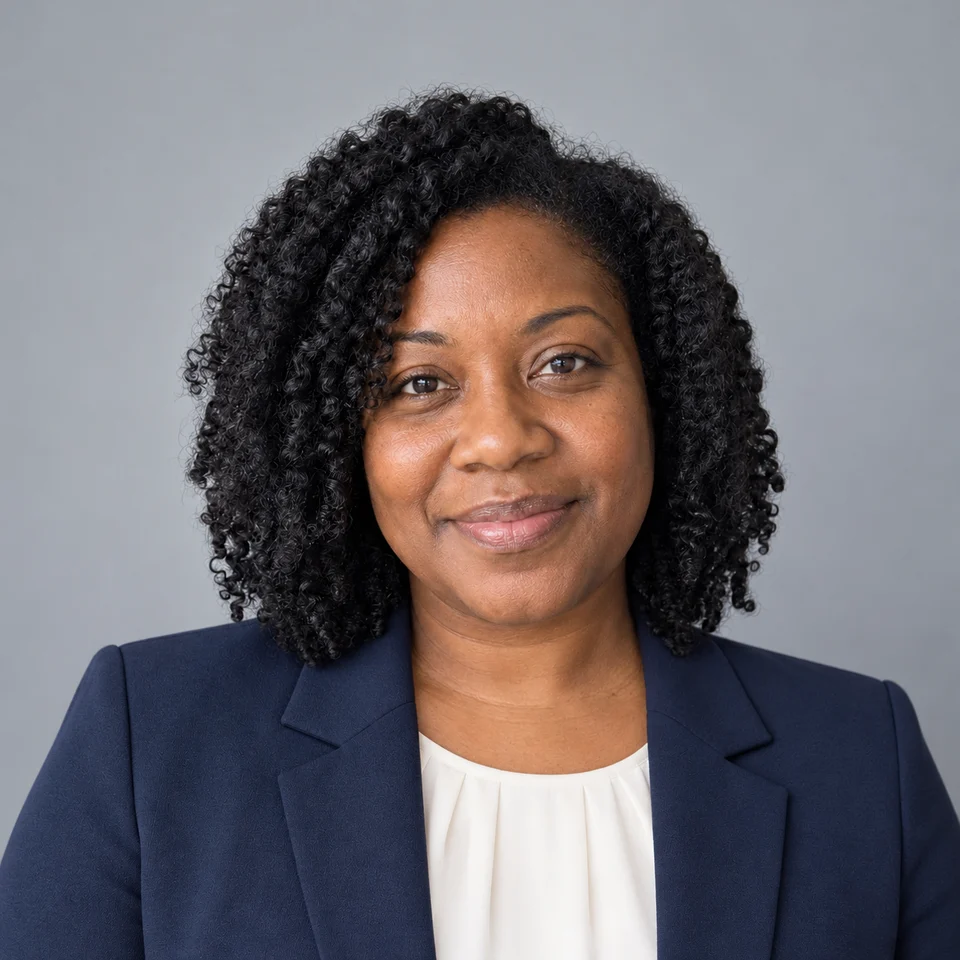
Graues Studio
Über KI-Bewerbungsfoto erstellen
Ein KI-Porträtgenerator verändert Hintergrund, Licht und Kleidung eines Fotos für einen professionellen Auftritt. Verwende ein gleichmäßig beleuchtetes Bild mit freiem Gesicht. Ein ruhiger Hintergrund und natürliche Hautdetails erleichtern die spätere Verwendung.
Geeignete Anwendungen
- Berufliche Profile und Teamvorstellungen
- Referentenbiografien und Portfolios
- Studio-, Büro- und Außenaufnahmen vergleichen
Beispielergebnisse
KI-generierte Beispiele
Warmes Büro
Kreatives Profil
Draußen aufgenommen
Weißer Hintergrund
Gründerporträt
Hellblaues Studio
Sanftes Beige
So funktioniert es
Ein klares Foto hochladen
Verwende ein Foto einer erwachsenen Person mit gut erkennbarem Gesicht und gleichmäßigem Licht. Du musst es bearbeiten dürfen.
Einen Stil wählen
Der erste Stil ist vorausgewählt. Ein Stilwechsel behält dein hochgeladenes Foto und das gewählte Modell bei.
Generieren und prüfen
Prüfe die angezeigten Credit-Kosten und generiere das Bild. Kontrolliere Details vor dem Download. Anmeldung und Kontolimits gelten weiterhin.
Originalprompts auf Englisch
Graues Studio
Create a professional head-and-shoulders photograph of the adult person in the reference photo. Preserve the exact identity, facial proportions, age, skin tone and natural skin texture. Keep the person fully clothed. One photograph, not a collage. No text, logos or watermark. A tailored navy blazer over an ivory shirt, plain cool-gray studio background, soft even front lighting.
Warmes Büro
Create a professional head-and-shoulders photograph of the adult person in the reference photo. Preserve the exact identity, facial proportions, age, skin tone and natural skin texture. Keep the person fully clothed. One photograph, not a collage. No text, logos or watermark. A charcoal business jacket and cream blouse or shirt, softly blurred modern office, warm natural window light.
Kreatives Profil
Create a professional head-and-shoulders photograph of the adult person in the reference photo. Preserve the exact identity, facial proportions, age, skin tone and natural skin texture. Keep the person fully clothed. One photograph, not a collage. No text, logos or watermark. A dark turtleneck and understated casual jacket, muted beige studio backdrop, soft editorial side light.
Draußen aufgenommen
Create a professional head-and-shoulders photograph of the adult person in the reference photo. Preserve the exact identity, facial proportions, age, skin tone and natural skin texture. Keep the person fully clothed. One photograph, not a collage. No text, logos or watermark. A smart blue button-up shirt, softly blurred green outdoor background, balanced open-shade daylight.
Weißer Hintergrund
Create a professional head-and-shoulders photograph of the adult person in the reference photo. Preserve the exact identity, facial proportions, age, skin tone and natural skin texture. Keep the person fully clothed. One photograph, not a collage. No text, logos or watermark. A simple navy business outfit, clean white background with gentle natural shadows, front-facing crop.
Gründerporträt
Create a professional head-and-shoulders photograph of the adult person in the reference photo. Preserve the exact identity, facial proportions, age, skin tone and natural skin texture. Keep the person fully clothed. One photograph, not a collage. No text, logos or watermark. A dark blazer over a plain crewneck top, warm minimalist workspace background, approachable natural expression.
Hellblaues Studio
Create a professional head-and-shoulders photograph of the adult person in the reference photo. Preserve the exact identity, facial proportions, age, skin tone and natural skin texture. Keep the person fully clothed. One photograph, not a collage. No text, logos or watermark. A medium gray jacket and white shirt, pale-blue studio backdrop, restrained corporate photography.
Sanftes Beige
Create a professional head-and-shoulders photograph of the adult person in the reference photo. Preserve the exact identity, facial proportions, age, skin tone and natural skin texture. Keep the person fully clothed. One photograph, not a collage. No text, logos or watermark. A light taupe blazer over a modest plain white top, matte warm beige backdrop, soft diffused daylight.
Häufige Fragen
Kann ich das Foto für LinkedIn oder eine Bewerbung verwenden?
Es kann als Profilbild dienen. Wähle ein Ergebnis, das dir weiterhin ähnlich sieht, und prüfe die Anforderungen der Plattform oder des Arbeitgebers. Vermeide irreführende Veränderungen deiner Identität.
Was sollte ich prüfen?
Dies ist kein Dienst für Identitätsprüfung oder amtlich anerkannte Passbilder. Prüfe Gesicht, Haare, Brille und Kleidung. Stelle keine Arbeitgeber, Qualifikationen oder Empfehlungen dar, die nicht zutreffen.
Muss ich zuerst ein Modell wählen?
Nein. Ein verfügbares Modell ist vorausgewählt. Lade dein Foto hoch und starte. Das Modell lässt sich in den erweiterten Einstellungen auf dieser Seite ändern; die Schaltfläche zeigt die aktuellen Credit-Kosten.
Woher stammen die Beispielbilder?
Die Beispiele wurden mit dem integrierten Bildgenerator und eigenen Prompts erstellt. Auch die erwachsenen Personen auf den Referenzfotos sind fiktiv. Die Bilder zeigen Gestaltungsideen, keine Kundenbewertungen oder gemessenen Ergebnisse der PicUnfold-API. Das Ergebnis hängt vom gewählten Modell und deiner Eingabe ab.
Kann ich es kostenlos testen?
Nach der E-Mail-Bestätigung gibt es Startguthaben, abhängig vom täglichen Kontingent. Jede Erstellung kostet die auf der Schaltfläche angezeigten Credits.
Was passiert mit meinen Fotos?
Deine Dateien sind privat. Beim Generieren wird das Referenzfoto zur Verarbeitung hochgeladen. Referenzdateien werden 7 Tage gespeichert, generierte Dateien 30 Tage. Lade Ergebnisse herunter, die du behalten möchtest. Einzelheiten zur Verarbeitung findest du in der Datenschutzerklärung.