
AI headshot generator
Example preview
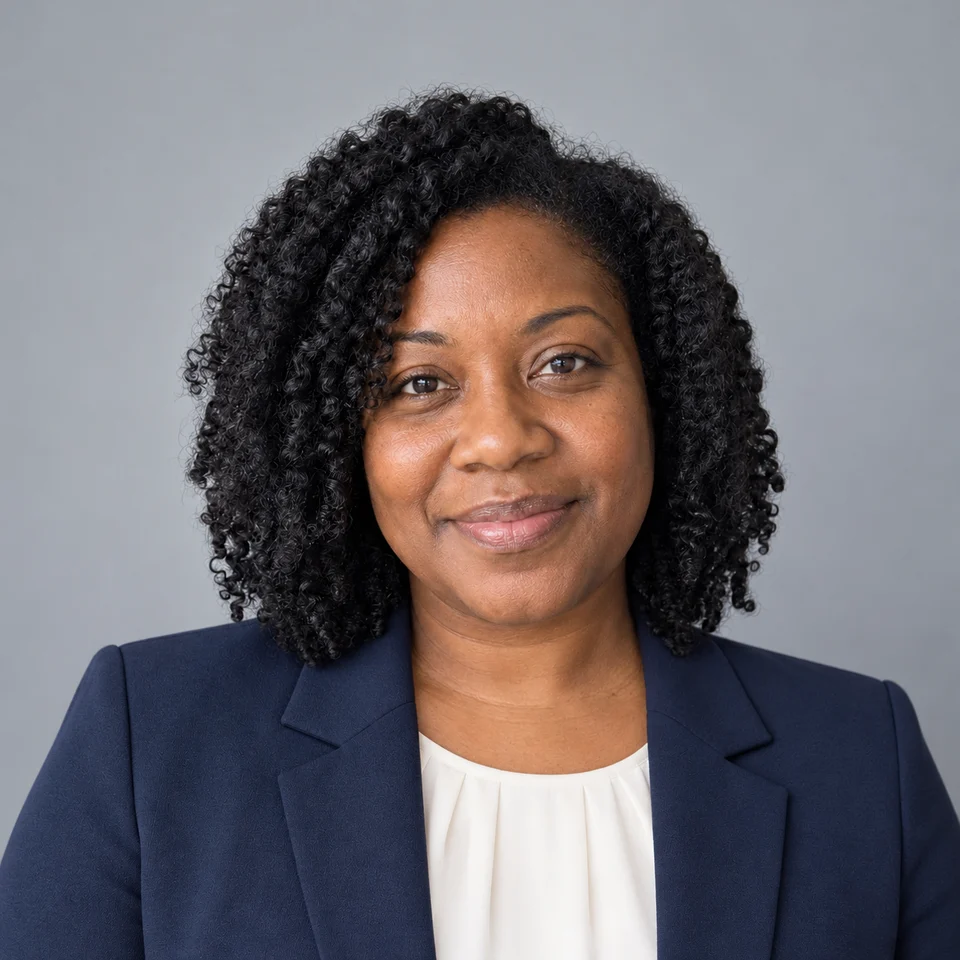
Studio gray
About AI headshot generator
An AI headshot generator changes the setting, lighting and outfit of a portrait to create a professional profile image. Start with a well-lit photo where your face is unobstructed. A restrained background and natural skin texture usually make the result easier to use.
When to use it
- Professional profiles and team introductions
- Speaker biographies and portfolio pages
- Comparing studio, office and outdoor looks
Example results
AI-generated examples
Warm office
Creative profile
Outdoor profile
White background
Founder portrait
Cool blue studio
Soft beige studio
How to use it
Upload a clear photo
Use a single adult subject with a visible face and even light. Use a photo you have permission to edit.
Choose a style
The first style is ready to use. Changing a style preserves your uploaded photo and your chosen model.
Generate and review
Review the displayed credit cost, generate, and check details before downloading. Sign-in and account limits apply.
Original English prompts
Studio gray
Create a professional head-and-shoulders photograph of the adult person in the reference photo. Preserve the exact identity, facial proportions, age, skin tone and natural skin texture. Keep the person fully clothed. One photograph, not a collage. No text, logos or watermark. A tailored navy blazer over an ivory shirt, plain cool-gray studio background, soft even front lighting.
Warm office
Create a professional head-and-shoulders photograph of the adult person in the reference photo. Preserve the exact identity, facial proportions, age, skin tone and natural skin texture. Keep the person fully clothed. One photograph, not a collage. No text, logos or watermark. A charcoal business jacket and cream blouse or shirt, softly blurred modern office, warm natural window light.
Creative profile
Create a professional head-and-shoulders photograph of the adult person in the reference photo. Preserve the exact identity, facial proportions, age, skin tone and natural skin texture. Keep the person fully clothed. One photograph, not a collage. No text, logos or watermark. A dark turtleneck and understated casual jacket, muted beige studio backdrop, soft editorial side light.
Outdoor profile
Create a professional head-and-shoulders photograph of the adult person in the reference photo. Preserve the exact identity, facial proportions, age, skin tone and natural skin texture. Keep the person fully clothed. One photograph, not a collage. No text, logos or watermark. A smart blue button-up shirt, softly blurred green outdoor background, balanced open-shade daylight.
White background
Create a professional head-and-shoulders photograph of the adult person in the reference photo. Preserve the exact identity, facial proportions, age, skin tone and natural skin texture. Keep the person fully clothed. One photograph, not a collage. No text, logos or watermark. A simple navy business outfit, clean white background with gentle natural shadows, front-facing crop.
Founder portrait
Create a professional head-and-shoulders photograph of the adult person in the reference photo. Preserve the exact identity, facial proportions, age, skin tone and natural skin texture. Keep the person fully clothed. One photograph, not a collage. No text, logos or watermark. A dark blazer over a plain crewneck top, warm minimalist workspace background, approachable natural expression.
Cool blue studio
Create a professional head-and-shoulders photograph of the adult person in the reference photo. Preserve the exact identity, facial proportions, age, skin tone and natural skin texture. Keep the person fully clothed. One photograph, not a collage. No text, logos or watermark. A medium gray jacket and white shirt, pale-blue studio backdrop, restrained corporate photography.
Soft beige studio
Create a professional head-and-shoulders photograph of the adult person in the reference photo. Preserve the exact identity, facial proportions, age, skin tone and natural skin texture. Keep the person fully clothed. One photograph, not a collage. No text, logos or watermark. A light taupe blazer over a modest plain white top, matte warm beige backdrop, soft diffused daylight.
Questions
How many photos do I need for an AI headshot?
Start with one clear photo of one person, facing the camera with even lighting. Choose one of eight looks and generate an image. Each new generation uses credits; review facial details and likeness before using it on LinkedIn or your resume.
What should I check?
This is a generated portrait, not an identity-verification or passport-photo service. Check facial details, hair, glasses and clothing. Do not imply an employer, credential or endorsement that you do not have.
Do I have to choose a model first?
No. A supported model is preselected. Upload your photo and generate. You can change the model in Advanced settings without leaving this page; the button shows the current credit cost.
Where do the example images come from?
The examples were created with the built-in image generator using original prompts and fictional adult reference portraits. They illustrate editing ideas, not customer testimonials or measured results from the PicUnfold API. Results depend on the selected model and your input.
Can I use this for free?
Verified accounts receive starter credits, subject to the daily allocation. Each generation uses the credits shown on the button.
What happens to my photos?
Your files are private. When you generate, the reference is uploaded for processing. Reference files are kept for 7 days and generated files for 30 days. Download any results you want to keep. See the privacy policy for processing details.